
Weighbridge Software FAQs
Have questions about weighbridge software, digital weighing records, weighment tickets, reporting or equipment compatibility? Find answers to common questions and learn what to consider when choosing a solution for your weighing operations.
Understand Weighbridge Software Before You Choose
Weighbridge software helps businesses organise vehicle weighing transactions, maintain digital records and review operational information. The available features, equipment connections and workflow options depend on the software configuration and the requirements of each site.
Weighbridge Software Basics
What is weighbridge software?
Weighbridge software is used to record and manage vehicle weighing transactions. Depending on the configuration, it can maintain vehicle, customer and material details, calculate net weight from gross and tare weights, generate weighment tickets and provide transaction reports.
Why do businesses use weighbridge management software?
Businesses use weighbridge software to organise weighing records, reduce repetitive manual entry, improve access to transaction history and simplify routine reporting. Actual benefits depend on the workflow, equipment and features implemented at the site.
Which industries can use weighbridge software?
Typical applications include manufacturing, logistics, mining, quarrying, construction, cement, agriculture, warehousing, scrap handling and commercial weighing operations. The suitable setup depends on each industry’s materials, vehicles and weighing process. Visit our Industries We Serve page for more information.
Can weighbridge software calculate net weight?
Net weight is commonly calculated by subtracting tare weight from gross weight. For example, a gross weight of 30,000 kg and a tare weight of 12,000 kg gives a net weight of 18,000 kg. Transactions should use the correct weight values and configured business rules.
Features, Tickets & Reporting
What features should I look for in weighbridge software?
Consider weight capture, vehicle and customer records, material management, gross/tare/net calculations, weighment ticket printing, transaction search, reporting, user access controls and compatibility with your existing weighing equipment. Select features based on your operating requirements.
Can the software generate weighment slips or tickets?
Weighbridge software can support the generation of weighment tickets containing configured transaction details. Ticket fields and print layouts should be confirmed during requirement discussions.
Can I search previous weighing transactions?
Transaction search and history depend on the selected software configuration. Common search fields may include date, ticket number, vehicle number, customer, supplier or material, where supported.
Does weighbridge software provide reports?
Reporting options may include daily transactions, vehicle-wise records, material-wise summaries and date-range reports. Confirm the available report formats and export options against your needs.
Can weighbridge software help reduce manual data-entry errors?
Structured transaction forms, supported weight capture and configured validation rules can help reduce repetitive manual entry. Accuracy still depends on equipment condition, correct configuration, operating procedures and user practices.
Equipment Compatibility & Integration
Can weighbridge software connect to an existing weighbridge?
Integration may be possible when the weighing indicator and its communication interface are compatible with the software. Share the indicator make, model, interface details and current setup so compatibility can be assessed before implementation.
Does the system support automatic weight capture?
Automatic weight capture depends on the supported indicator, communication method and software configuration. Equipment compatibility and operating conditions should be verified before confirming this functionality for your site.
Can weighbridge software work with ANPR, RFID or barriers?
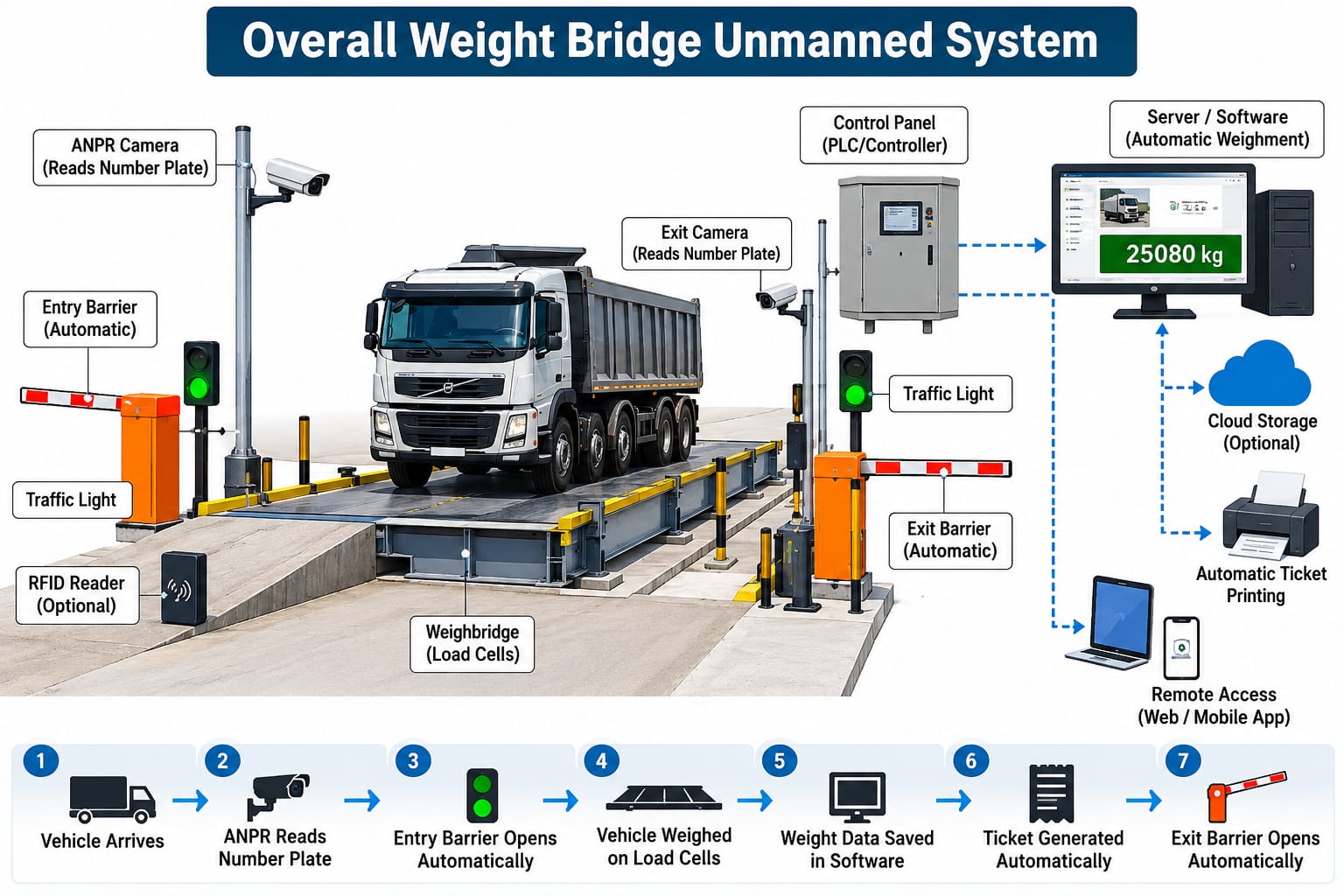
Vehicle recognition cameras, RFID readers, barriers and other automation equipment may require additional hardware, compatible interfaces and custom configuration. Availability should be confirmed against your equipment and workflow requirements.
Can weighbridge data integrate with ERP or accounting software?
Integration with ERP, accounting or other business systems depends on the available interfaces, APIs, data formats and the requirements of both systems. Share the name of your existing software and the information you need to exchange for a feasibility review.
Installation, Configuration & Support
What information is needed before selecting weighbridge software?
Prepare your weighbridge capacity, indicator make and model, number of weighbridges, expected transaction volume, ticket format, required reports, vehicle workflow and any integration requirements. This information helps define an appropriate solution.
How long does weighbridge software installation take?
Implementation time varies with software configuration, equipment compatibility, data migration, customisation, testing and staff training. A realistic timeline can be discussed after reviewing the site’s requirements.
Can the software be customised for our weighing process?
Customisation requirements can be reviewed for transaction fields, ticket layouts, reports and workflow needs. Feasibility, cost and timeline depend on the requested changes and the software’s existing capabilities.
How can I request a demo or discuss my requirements?
Contact Weighing Soft with your industry, weighbridge details, equipment model and required features. Call +91 87967 11086, email info@weighingscalesoft.com, or contact our team through WhatsApp.
Didn’t Find Your Answer?
Tell us about your weighbridge, equipment and operational requirements. Our team can help you identify the details needed to assess a suitable solution.
Ask a Question on WhatsApp →Need Help Choosing Weighbridge Software?
Discuss your weighing workflow, equipment compatibility, reporting needs and implementation requirements with our team.